
Teaching AI Without the Black Box: A Free 45-Minute Lesson Plan for Your Classroom
16/10/26
- Subject ICT · STEM · Robotics
- Duration 45 minutes
- Method Inquiry-based
- Cost Free, no account
Most students meet Artificial Intelligence as a black box: something that works, but nobody can see how. CityLab, a STEM lab based in Athens, built CityLab Evo to change that. It turns AI from an abstract idea into something students can watch, test and understand in a single lesson.
Why CityLab Evo belongs in the classroom
CityLab Evo is a free simulation that runs in any web browser. There is nothing to install and no account to create, so it is GDPR-friendly and ready to use in a school computer lab straight away.
In the simulation, a fleet of virtual cars tries to drive around a track. Nobody programs them with rules like “if you see a wall, turn left”. Instead, the cars learn from scratch using neural networks and genetic algorithms, and students watch it happen generation by generation.
Nothing is hidden
1
The brain is just numbers
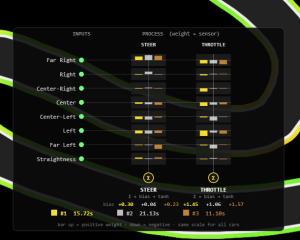
Each car’s “brain” is a set of numbers, and those numbers are on screen the whole time.
2
Seven live sensors
The readings from each car’s seven sensors are shown at the exact moment it decides to steer.
3
Students take the controls
Change the mutation rate or the population size and see the effect immediately.
The result is a lesson where understanding comes from experimenting and observing, not from memorising theory. Below is the ready-to-use 45-minute lesson plan CityLab has built around this experience. Full definitions of the AI concepts and a deeper look at the algorithms are available on the CityLab website.
What your students will learn
By the end of the 45 minutes, students will be able to:
Understand
That AI systems learn from data and repetition, not from a list of rules written by a programmer.
Apply
The scientific method: change one variable at a time (mutation rate, population size) and observe what happens.
Evaluate
How well an algorithm performed and why, using the right vocabulary: sensors, generations, fitness.
What you need
- Devices: one PC or tablet per group of two or three students, with a web browser.
- Software: the CityLab Evo platform — free, no installation, no accounts, full access to every feature.
- Optional: a projector or smartboard for the introduction and the final discussion.
The 45-minute lesson, step by step
The lesson follows four phases. Click each one to see the activity, your role as the teacher, and the key question to put to the class.
0–10 minEngage — “Why?”
Students open CityLab Evo and use the Draw tool to create their own track. They start the simulation and watch the first generation of cars crash almost immediately.
Your roleSpark curiosity, not explanations. Resist the urge to give answers.
10–20 minObserve — “How?”
Students let the simulation run and watch the next generations. They see the seven sensors reacting to the walls, the numbers in each car’s brain changing, and the cars gradually getting further along the track.
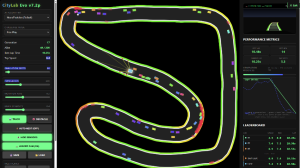
Your roleOpen up the black box. Point to the visual data on screen and help students connect what the sensors “see” to what the cars do.
20–35 minExperiment — “What if?”
Students work in small groups, and each group changes exactly one setting. For example, Group A doubles the mutation rate, Group B halves the population, Group C switches to the “Rules” algorithm, and so on. Each group records what happens.
Your roleProtect the experiment. If a group changes two things at once, the results tell them nothing, so keep everyone to one variable.
35–45 minReflect — “So what?”
Bring the class back together. Each group shares its findings. Then guide a short discussion on the shift from classical programming (where we give the computer the rules) to machine learning (where we give it a goal and some data and let it work out the rules itself).
Your roleSteer the conversation away from “who won the race” and towards how the learning actually happened.
How to check what they learned
You do not need a test. Two things tell you whether the lesson landed:
- During Phase 3, did each group keep to a single variable?
- During the final discussion, did students use the right words (sensors, generation, training) to explain what they saw?
Want a hook for next time? Tell the class about Competition Mode. Ask each group to export its best-trained “brain” at the end of the lesson, then hold a classroom championship in the next session.
Free to use, in any way you like
CityLab has released both the lesson plan and the CityLab Evo software completely free, with no restrictions. You can use them, share them, adapt them and build them into your own teaching however works best for you and your students.
Like to support the team behind it? (entirely optional) The CityLab team say their greatest reward is seeing these tools used in classrooms around the world. If this resource helped you, they would appreciate a quick review or a mention on social media — and they would love to hear which school and country you are in, and how the lesson helped your students discover AI.
