Code Club Online: Bringing Coding to Classrooms Across Finland
09/04/26
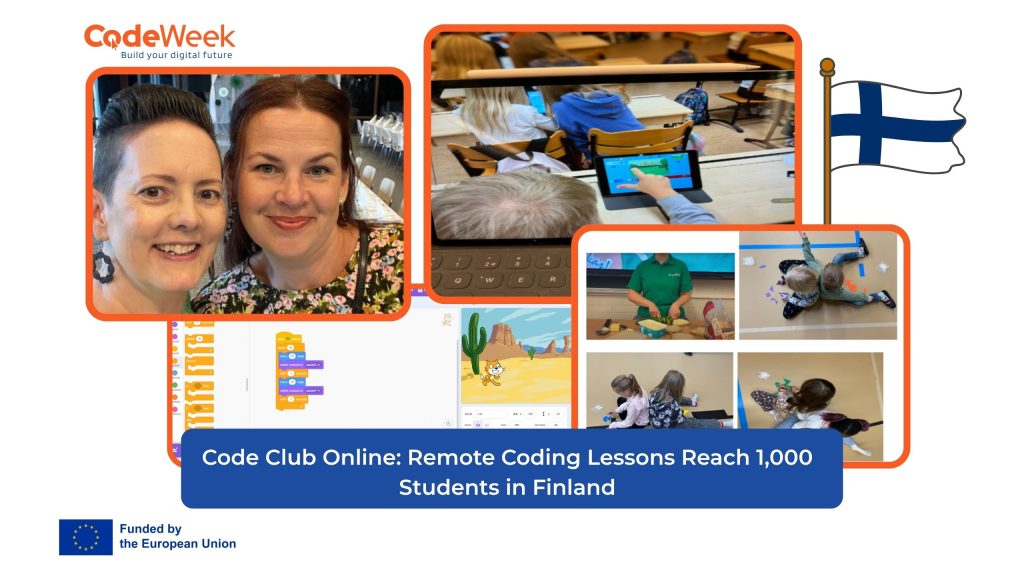
As part of our series spotlighting the EU Code Week Small Grants Nordic winners, we are taking a closer look at Code Club Online, an inspiring initiative from Finland that brought engaging remote coding lessons to over 1,000 students across the country.
Developed by leading teachers Anu Kahri and Hanne Ritala, Code Club Online was designed to make programming accessible, interactive and enjoyable for primary school children, while also giving teachers practical ways to bring coding into the classroom.
From grant award to nationwide classroom impact
Planning for Code Club Online began in January, shortly after the team learned that they had been awarded the EU Code Week Nordic grant. The funding provided both the motivation and the resources needed to design a series of engaging remote sessions introducing programming concepts to primary school children.
With prior experience in both coding education and online teaching, the team knew what was needed to keep young learners engaged throughout a 45-minute lesson. Their goal was to create sessions that were interactive, practical and easy for teachers to follow with their classes during the school day.
Promoting the lessons
To spread the word, the team launched a short promotional campaign across social media and education networks. The lessons were shared on the Innokas website, as well as through the City of Espoo’s internal communication channels and education portal.
Despite the short promotion period, the initiative attracted strong interest from schools across Finland. Because the sessions took place during school hours, teachers were able to participate live with their classes.
Over 1,000 students reached
In total, more than 100 teachers and over 1,000 students aged 6 to 12 took part in the Code Club Online lessons from across Finland.
| Lesson module | Students | Teachers |
|---|---|---|
| Programming without devices | 397 | 47 |
| Scratch Junior | 310 | 35 |
| How to start with Scratch | 193 | 15 |
| micro:bit | 169 | 12 |
| Total | 1069 | 109 |
All four lesson modules were designed to be interactive and easy to follow. Teachers joined using their own devices, while students watched on classroom smartboards and took part by following instructions in real time. This proved to be an effective way to reach large numbers of students and teachers at once.
Lesson 1: Programming without devices
The first lesson introduced students to the basic principles of programming without requiring any digital devices. Instructor Hanne opened the session by explaining how robots are all around us in everyday life and how they depend on precise instructions to function.
One of the most memorable activities was “Program the Teacher Robot”. In this exercise, instructor Anu acted as a robot whose task was to make a cucumber sandwich. Students had to give the clearest and simplest possible commands, which were sent through the classroom chat. Anu then carried them out exactly as instructed.
This fun and practical activity helped children understand that robots without artificial intelligence cannot interpret vague commands. Instead, tasks must be broken down into clear, precise and unambiguous steps.
In later exercises, students followed programming-style instructions to draw patterns on graph paper and worked in pairs to build the same structure using LEGO bricks, tangram pieces or similar classroom materials, without seeing each other’s work. These activities supported both computational thinking and communication skills.
You can see one example of classroom participation in this Instagram post from a participating school: view post.
Lesson 2: Starting with Scratch
The Scratch session was designed for students who had never used the platform before and for teachers who were interested in introducing it in the classroom for the first time.
During the opening part of the lesson, Anu guided students through the Scratch interface, showing them how to add and remove characters, choose backgrounds, resize sprites and understand the main coding area. Students were introduced to simple movement commands and quickly began experimenting with how to make characters move naturally across the screen.
The lesson then moved on to more advanced challenges, including creating a conversation between two characters. Students also got a first introduction to useful structures such as repeat and wait, helping them see how coding can be used to create more dynamic and expressive projects.
Lesson 3: Scratch Junior
The ScratchJr lesson was tailored for younger children, especially those aged around 6 to 8, many of whom were working in pairs on touchscreen devices. As with the Scratch lesson, the session began with a guided introduction to the interface and where the programming takes place.
Students then took on three core challenges:
- Moving a character across the screen
- Creating a speed race with three characters
- Programming a conversation between two characters
The team had found from previous experience that three challenges is the right pace for a 45-minute session. While students worked, the instructor stayed actively involved, answering questions and offering extension activities to those who finished quickly.
Lesson 4: Micro:bit basics
The Micro:bit lesson introduced students to the basic features of the device using the browser-based MakeCode environment. This meant that schools did not need physical Micro:bits to take part, although students with access to devices and accessories could use them during the lesson.
The session covered:
- Getting to know the physical components of a Micro:bit
- Exploring the MakeCode programming environment
- Learning how to download a program onto the device
- Creating a small personal project
Some students even managed to create a digital dice during the session, showing how quickly learners can move from introduction to creation when given the right support.
Another participating school shared their experience on Instagram here: view post.
Supporting teachers beyond the live lessons
After each session, participating teachers received a follow-up email reviewing what had been covered and sharing suggestions for next steps. This helped extend the learning beyond the live lesson and supported teachers in continuing coding activities independently with their students.
Among the resources shared was the Programming in Education material, which is also available in English. Developed through the Innokas Network, this resource supports teachers in introducing computational thinking and programming step by step, in line with the Finnish national core curriculum.
The material can be used across early childhood, basic and secondary education, making it a valuable tool for sustained, long-term engagement with digital skills learning.
A scalable model for coding education
Code Club Online shows how remote learning can be used effectively to bring coding education to large numbers of students and teachers in a short period of time. By combining practical activities, accessible tools and strong teacher support, the project created a model that is both scalable and easy to replicate.
It also highlights the important role teachers play in building confidence around coding in the classroom. By lowering the threshold for educators and giving them ready-to-use approaches, projects like this can have an impact well beyond a single lesson.
Discover more
Code Club Online was one of the winning initiatives featured in the EU Code Week Small Grants Nordic winners announcement, which celebrated grassroots projects helping young people across the region engage with coding, creativity and digital skills.
Anu Kahri and Hanne Ritala
Our thanks to Anu Kahri and Hanne Ritala for sharing this inspiring example of how online learning can open up coding opportunities for classrooms across Finland.
